
Download OpenSong – Free Lyrics, Chords & Presentation Manager
Overview
OpenSong is a powerful, open‑source application that brings together everything a worship leader, band member, or presenter needs to manage lyrics, chords, lead sheets, and on‑stage projections. Designed with simplicity and flexibility in mind, OpenSong lets you store a complete song library, automatically transpose chords into any key, and customize the visual layout of every sheet. Whether you’re preparing a Sunday service, rehearsing a gig, or creating a multimedia presentation, OpenSong offers a secure, free platform that works across multiple operating systems.
The software tracks essential metadata such as tempo, time signature, author credits, and copyright information, ensuring that you always have the right details at your fingertips. In addition to static sheet printing, OpenSong shines in live environments: you can queue songs, display Bible verses, run timed loops for announcements, and even embed background images to match your visual theme. The intuitive interface requires little training, making it ideal for churches, schools, small venues, or solo musicians who want a reliable tool without the cost of commercial alternatives.
With regular community updates and a vibrant support forum, OpenSong remains a trusted solution for anyone who needs to organize, edit, and present music and related content in a seamless, professional manner.
Key Features
- Automatic chord transposition – Change the key of any song with a single click, and OpenSong recalculates every chord instantly.
- Customizable sheet layout – Choose fonts, sizes, colors, and background images for titles, authors, lyrics, and chord symbols.
- Comprehensive song metadata – Store tempo, time signature, copyright details, and notes for each piece.
- Print-ready PDFs – Export sheets in multiple chord formats (e.g., inline, separate chord lines) for easy distribution.
- Live projection mode – Queue songs, display verses, and run timed loops for announcements or multimedia content.
- Bible verse integration – Import and display verses alongside song lyrics for worship services.
- Multi‑language support – Unicode‑compatible interface lets you work with non‑Latin scripts and right‑to‑left languages.
- Open‑source community – Free to download, modify, and redistribute under the GPL license.
- Cross‑platform compatibility – Runs on Windows, macOS, and Linux, with mobile viewers available for Android and iOS.
- Secure updates – Automatic verification of new releases ensures you always download a safe, untampered version.
Installation, Usage & Compatibility
Getting Started
Downloading OpenSong is straightforward. Visit the official website, click the “Download” button for your operating system, and run the installer. Windows users receive a standard .exe package, macOS users get a .dmg file, and Linux users can install via the provided .deb or .tar.gz archive. The installer guides you through standard steps: accepting the license, choosing an installation folder, and creating desktop shortcuts. Because OpenSong is open source, the installer also offers an optional “portable” mode that lets you run the program from a USB stick without modifying system files.
First‑time Configuration
When you launch OpenSong for the first time, a quick wizard helps you set up your song library. You can import existing chord charts in plain text, CSV, or MusicXML formats, or start building a new collection from scratch. The wizard also prompts you to choose a default font theme and background image for live projections, ensuring a polished look right out of the gate. All settings are saved in a user‑specific configuration file, making it easy to sync your preferences across multiple devices using cloud storage.
Daily Workflow
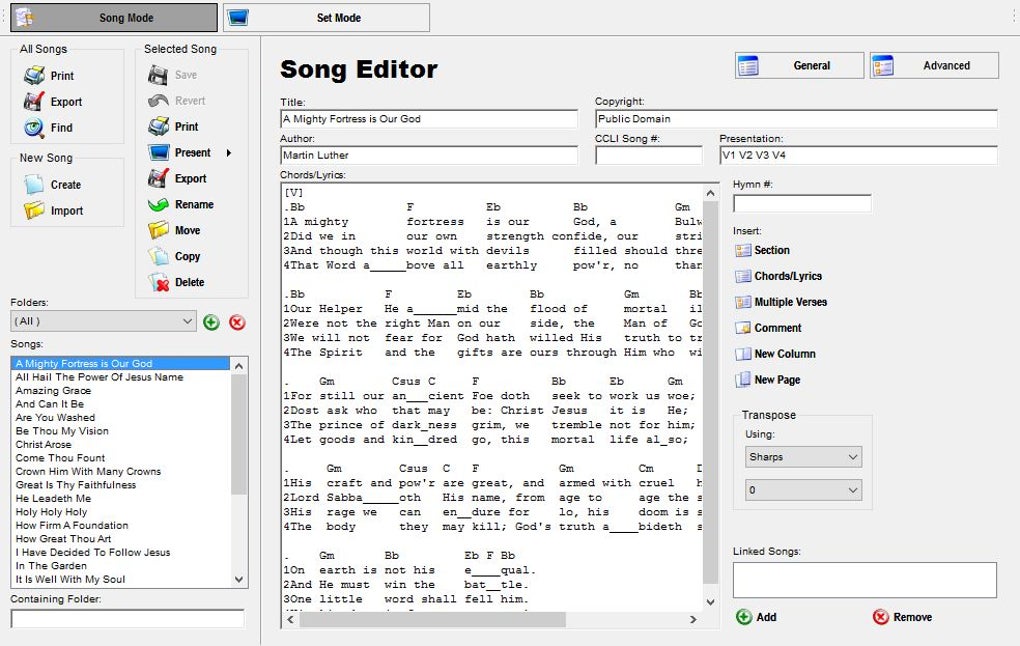
Adding a new song is as simple as clicking the “New Song” button, entering the title, author, and lyrics, then typing chords above the relevant lyric lines. OpenSong automatically detects chord symbols and lets you shift the entire song to a new key with the “Transpose” command. When you’re ready to rehearse or perform, switch to “Presentation Mode.” Here you can arrange songs in the order they’ll appear, add Bible verses, set slide‑change timers, and insert background images for each slide. The built‑in projector view is full‑screen, high‑contrast, and can be controlled remotely via a companion mobile app.
Compatibility Details
OpenSong supports Windows 10/11 (32‑bit and 64‑bit), macOS 10.13 or later, and major Linux distributions such as Ubuntu, Fedora, and Debian. For on‑stage displays, the software works with any HDMI or VGA projector and can also output to secondary monitors via extended desktop mode. Mobile viewers are available on Android 5.0+ and iOS 11+, allowing worship teams to sync lyrics to a tablet or smartphone without additional cables.
Pros & Cons, FAQ & Final Thoughts
Pros
- Completely free and open‑source – no hidden fees or subscription models.
- Robust chord transposition engine saves countless rehearsal hours.
- Highly customizable visual design for both printed sheets and live projections.
- Cross‑platform support ensures the same experience on Windows, macOS, and Linux.
- Active community provides regular updates, bug fixes, and feature requests.
Cons
- Interface feels dated compared to modern commercial worship apps.
- No built‑in cloud sync; users must rely on third‑party services for backup.
- Mobile companion apps are functional but lack some advanced features of the desktop version.
- Initial learning curve for users unfamiliar with chord notation software.
- Limited built‑in audio playback or metronome functions.
Frequently Asked Questions
Is OpenSong really free?
Yes. OpenSong is released under the GNU GPL license, which means you can download, use, and modify the software at no cost.
Can I use OpenSong on a Mac?
Absolutely. OpenSong provides a native macOS installer that works on macOS 10.13 (High Sierra) and newer versions.
How does the transposition feature work?
Select a song, click the “Transpose” button, choose the target key, and OpenSong recalculates every chord automatically while preserving the original lyric layout.
Is there a way to back up my song library?
Since OpenSong stores data in plain‑text files, you can simply copy the “Songs” folder to a cloud service like Dropbox or Google Drive for automatic backup.
Can I display Bible verses alongside lyrics?
Yes. OpenSong includes a built‑in Bible module where you can select verses and insert them into your presentation queue.
Conclusion & Call to Action
OpenSong delivers a complete, free solution for anyone who needs to manage lyrics, chords, and live presentations without breaking the bank. Its powerful transposition engine, flexible design options, and cross‑platform compatibility make it a standout choice for churches, schools, and independent musicians alike. While the UI may feel a bit dated and cloud sync isn’t built‑in, the active open‑source community ensures continuous improvements and reliable support. If you’re looking for a secure, update‑driven tool that lets you focus on music rather than software hassles, download OpenSong today and experience the freedom of a truly open‑source music management suite.







